Category: Tech

  • What Role Do Data Storage Solutions Play in Disaster Recovery?

    Companies nowadays are subjected to more dangers than ever before. Natural disasters, cyber attacks, and unexpected system crashes have the potential to close down day-to-day operations. Data is possibly the most precious commodity for any business. 

    Indeed, 60% of small businesses shut down within six months of being the target of a cyberattack or data breach.

    This figure informs us regarding the extent of the issue. Lost critical data can translate to lost business and lost income. That is where data storage solutions come in. In the event of a disaster, they make information accessible and safe. 

    Without them, people and businesses stay stuck and cannot work. So, let us see how data storage helps during disasters and why it is one of the most important tools today.

    Why Data Storage is Important for Recovery

    When there is a disaster, companies tend to lose access to their systems. They are not able to get back to work through data storage solutions. These solutions provide companies with a method of storing, accessing, and retrieving files efficiently.

    Types of Disasters That Impact Data

    Disasters can occur in numerous ways. There are natural disasters, as well as man-made ones. Both have the potential to cause extensive damage.

    • Floods or fires have the potential to damage servers in an office.
    • Cyber attacks can steal or lock sensitive files.
    • Power outages can cause system crashes.
    • Hardware failures can erase entire storage drives.

    Data storage solutions equip companies with the ability to respond to each of these issues without losing control.

    1. Backup as the First Layer of Defense

    A reliable backup system is the beginning of disaster recovery. Companies maintain copies of their files in secure places. These backups enable them to bring systems online quickly.

    Cloud Backup vs Local Backup

    Two general methods of backup data storage. “Local” refers to having data on physical drives within the office. Cloud refers to storing data on remote servers accessed over the internet.

    • Local backups are easy to access.
    • Cloud backups are secure even if the office system is lost.
    • Both are used by many businesses for added protection.

    This combination makes a more resilient disaster recovery plan.

    2. Speed and Accessibility Save Time

    During a disaster, time is the largest variable. Downtime per minute is costly. Data storage solutions minimize this downtime by making recovery quicker.

    Why Speed of Recovery is Important

    Rapid recovery allows the business to support customers without extended downtime. It also creates trust since customers are sure their details are secure. Speed also enables groups to work again without getting confused or delayed.

    • Rapid access minimizes money loss.
    • Staff can resume tasks without hesitation.
    • Customers remain linked with the company.

    3. Data Security During Disaster Recovery

    Recovery is not just access. It is also security. If the storage system is compromised, hackers can exploit the disaster as an opportunity to steal data.

    Security Features That Safeguard Data

    Contemporary data storage technologies are accompanied by robust protection layers. They ensure files remain secure even when recovery is ongoing.

    • Encryption defends data against outside threats.
    • Access control prevents unauthorized personnel from opening files.
    • Monitoring software monitors suspicious behavior in real-time.

    4. Scalability Aids During Times of Uncertainty

    Companies expand, and with them their data. At the time of disaster, a small system might not be able to cope with the load. Scalable storage ensures that companies are able to store data securely as it grows.

    The Role of Flexible Storage

    Scalable solutions adjust as data increases. This is key when sudden growth or large recovery demands take place.

    • Easy upgrades without disruption.
    • Cost control by paying only for what is needed.
    • Ability to handle sudden spikes in storage use.

    This flexibility supports disaster recovery in both small and large companies.

    5. Compliance and Legal Safety

    Most industries have to comply with regulations regarding how data is stored and safeguarded. Disaster recovery plans should honor these regulations. Data storage solutions enable businesses to remain compliant even in situations of trouble.

    Why Compliance Matters

    Not adhering to guidelines can lead to severe penalties or revocation of licenses. Data storage systems built with compliance maintain documents in the appropriate format and place. This allows companies to be in compliance even during recovery processes.

    6. Continuous Testing Builds Confidence

    Having disaster recovery systems is not sufficient. Firms need to test them regularly to ensure recovery functions in case of need.

    As a result of no testing, businesses might realize the loopholes only during a catastrophe. That would lead to delays and losses.

    • Testing identifies vulnerable areas.
    • Staff learn to restore files step by step.
    • Firms become confident in their disaster recovery plan.

    7. Business Continuity Depends on Storage

    Disaster recovery is just half of the objective. Business continuity is the primary objective. That involves maintaining services without significant interruptions. Data storage solutions enable this by maintaining files in the background.

    How Storage Enables Continuity

    When workers use safe backup and quick recovery features, the company never completely shuts down.

    • Projects proceed without losing momentum.
    • Customer support remains active.
    • Company reputation is not affected.

    The Key Takeaway

    When disaster strikes, it doesn’t care about schedules or timelines. Companies that are ready with strong data storage solutions recover quicker with reduced loss. Backup systems retain safety in files. Security tools safeguard files against hackers. 

    Scalable systems accommodate expansion, and testing keeps all ready. Compliance features provide legal safety and continuity guarantees; work never halts. Disaster recovery is only as robust as the storage that stands behind it. 

    Those companies that invest in secure data storage guard their future. Ultimately, it is not so much a matter of saving data. It is a matter of saving the business itself.
     

  • 7 Common Storage Challenges Solved by Fiber Channel

    People and companies store more data every day. By 2025, it is anticipated that the total amount of data stored worldwide will surpass 200 zettabytes, and this figure will continue to rise.

    This massive amount of data creates lots of issues. Devices get slower. Files get misplaced. Systems get crashed when they are needed most.

    Most users find it challenging to resolve these issues. The fact is that most storage systems are not up to this level of work. They might be too sluggish, fail too frequently, or not support many users concurrently. But there is an answer that has assisted countless people. This answer is known as Fiber Channel.

    Fiber Channel provides a quicker, safer method of transferring and storing information. It also prevents frequent issues before they become larger.

    Keep reading to learn seven storage issues that Fiber Channel can solve. 

    1. Tackling Slow Data Transfer

    One of the largest challenges with storage networks is slow-moving data. Applications require data at high speed in order to operate well. Any slowdown impacts business processes. Fiber Channel addresses this by offering guaranteed high-speed transfers. It offers blazingly quick data transfer rates of 16, 32, or 64 Gbps. It’s a lot faster than the majority of standard systems.

    Why Speed Matters

    Quicker data access enables teams to work with zero interruptions. It optimizes application response and minimizes wait time. For companies with databases or AI workloads, each second matters. It makes sure data moves rapidly and without delays.

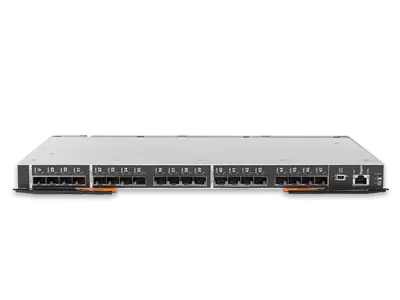
    Flex System FC5022 16/8Gb SAN Scalable Switch

    Major benefits:

    • Transfers data with high speed.
    • Optimizes application response time.
    • Handles intensive workloads such as AI and analytics.

    2. Solving Downtime Issues

    Downtime for storage networks can bring key services to a standstill. Time and money are wasted when systems crash. Fiber Channel avoids this risk with a model designed for stability.

    Why It Keeps Systems Running

    It is built to support redundancy. Should one path fail, it automatically shifts to another path. This prevents system crashes and maintains storage at all times. Such reliability is important to sectors like healthcare or finance, where downtime is costly.

    • Protects vital operations from downtime.
    • Ensures business continuity.
    • Reduces losses should the system fail.

    3. Handling Growing Data Volumes

    Information keeps increasing on a daily basis. Traditional systems typically cannot handle high loads. Fiber Channel offers scalability, which makes it easy to handle big loads.

    Scaling with Business Needs

    Firms can expand their storage without compromising performance. This network scales nicely. This avoids companies from suffering from disruptions when they add new workloads or add capacity.

    4. Reducing Network Congestion

    Most storage networks suffer from congestion. When devices are accessing storage at the same time, congestion takes place. Fiber Channel corrects this by separating storage traffic from all other forms of traffic.

    The Advantage of Isolation

    The setup offers clean and uninterrupted data movement. It prevents delays that could slow down applications. With a dedicated path for storage, companies enjoy better performance in their systems.

    • Without hesitation, it operates around the clock.
    • Delivers pressure consistently.
    • Keeps data safe during power outages.

    5. Improving Data Transfer Security

    Security is paramount in businesses. Information must be protected while crossing networks. Fiber Channel provides options for security that shield sensitive data.

    Secure Fiber Channel Transfers

    It uses zoning and encryption to provide data protection. Zoning controls who sees a given section of the network. Encryption preserves information confidentiality. These methods protect against both external and internal threats.

    6. Making Storage Management Simple

    Complexity is an issue of storage as well. Old networks take high-end manual efforts for configuration and administration. Fiber Channel avoids complexity through its systematic approach.

    Why Simple Management Helps IT Teams

    IT personnel save time with well-defined procedures and tools. They are able to focus on performance optimization instead of fixing errors. These networks also provide central control, reducing confusion.

    7. Support for High-Performance Applications

    Today’s companies employ applications that require peak performance. From workloads in the cloud to analytics, these applications require robust storage support. Fiber Channel provides high performance and low latency to satisfy these requirements.

    Future-Ready Performance

    It guarantees that performance does not decrease even with heavy usage. This makes it a viable option for companies gearing up for AI or big data initiatives. This network remains to handle modern applications unaltered.

    Why enterprises benefit:

    • Gives consistent throughput for high loads.
    • Offers low latency for real-time applications.
    • Maintains robust performance when under maximum utilization.

    In The End

    Storage problems waste time, money, and peace of mind. They cause delays and stress. But there is a smart way to solve them. This network is the smart way. It helps stop the most common issues before they become major trouble.

    It speeds things up. It keeps data safe. It supports big teams. It grows with your needs. It protects your files and helps your apps work better.

    By solving these common storage challenges, Fibre Channel has become a trusted choice for many teams across the world. It gives people the freedom to focus on their work, not their storage issues.

    A better storage system is not a dream. It is a choice. Fiber channel helps make that choice easy

  • 7 Practical Tips for Upgrading Rack Server Hardware Safely

    Upgrading a rack server does not need to be stressful. With a calm plan, the right parts, and simple habits, you can add life to your gear and save real money. 

    Many teams jump straight to new hardware when a few upgrades would fix the pain. Memory, storage, network cards, and even CPUs can be swapped with care. 

    The key is to know your goal, check support lists, and follow a safe process. So let us walk through seven ways to upgrade a rack server with confidence. We also remind you to take photos and notes, so the next upgrade goes even better. 

    The goal is not just faster parts; it is a repeatable way to keep your servers useful and reliable.

    1. Start With A Plan And A Clean Inventory

    Before you touch the rails, know what you are fixing. Are you short on memory, running out of storage, or hitting network limits at peak times? Pull basic stats from the server: CPU, memory, disk, and NIC use during a normal week. 

    List the exact model of the chassis, motherboard, and power supplies. When working with a rack server, always check the vendor’s guide for supported CPUs, DIMMs, and drive types. Note firmware versions so you can update during the same trip. 

    When you begin with a plan, you avoid panic and surprises. You also keep yourself honest about what change will bring the biggest gain for the least cost and downtime.

    2. Prepare The Workspace And Protect The Hardware

    Good prep prevents sad stories. Clear a sturdy table, set a small parts tray, and lay out the tools you actually need. 

    Wear an anti-static strap when handling boards or memory. Power down the server, unplug the power cords, and wait for the lights to fade. 

    Pull the server from the rack with a helper if it is heavy. Keep screws together by section, and take a few phone photos of cable routes before you move them. Have labels ready in case two similar cables could get mixed. 

    • Wear an anti-static strap and work on a grounded surface
    • Power down, unplug, and let capacitors discharge before opening
    • Photograph cable paths and label look-alike connectors
    • Keep a parts tray so nothing rolls away inside the chassis

    3. Add Memory The Right Way For Balance And Speed

    Memory upgrades are often the quickest win. Check your board map so you place DIMMs in the correct slots for your channel layout. Use matched sizes and speeds when possible, and avoid mixing many different models in one bank. 

    If the server has two CPU sockets, split the new memory between them to keep the balance. Push firmly until latches snap, because half-seated DIMMs cause strange errors that waste hours. 

    After the first boot, enter the BIOS and confirm the total memory, speed, and mode. If the number looks wrong, shut down and reseat. Then boot the OS and run a short memory test while you watch the logs.

    4. Expand Storage Without Painting Yourself Into A Corner

    Storage upgrades can help with both speed and space, but they need a clear plan. Decide what data must be fast and what data can be slow. Use NVMe or SSDs for hot areas and bigger SATA drives or arrays for colder data.

     If your controller supports it, choose RAID levels that match your goals for speed and safety. Keep firmware current on both the controller and the drives, and always test rebuild time, not just peak speed.

    5. Upgrade CPUs only When The Platform Supports It

    A CPU swap can be great, but only if the board and power design support the target model. Read the vendor list for approved CPUs and the minimum BIOS version needed. 

    Some servers cannot handle the thermal load of the very top chip, so pick a smart middle tier that stays cool and stable. When you swap CPUs, clean the old thermal paste and apply a thin, even layer of new paste. 

    Then run a stress test that looks like your real work. If you hear odd fan surges or see clock drops, check paste and airflow. A clean install with the right part gives you better speed today and an easier support story tomorrow, because you are staying inside tested limits.

    6. Add Or Refresh PCIe cards For Network And Acceleration

    Many workloads speed up when you add the right PCIe card. This could be a faster network interface, a storage HBA, or an accelerator like a GPU or FPGA. 

    Before you buy, confirm lane counts and slot sizes in your manual so the card runs at full speed. Think about heat, too. Busy cards need clear airflow, and sometimes their own power leads. 

    After installation, lock the card with the bracket, route cables neatly, and update drivers to a known-good version. Then test the new path with real traffic, not just a quick ping. 

    • Match slot bandwidth and lane count to the new card
    • Keep airflow clear; avoid blocking front-to-back paths
    • Place high-traffic cards near the CPU that serves them

    7. Test, Document, And Make Rollback Easy

    When the hardware looks good, testing is the last big step. Bring the server up with one change at a time if you can. Run checks that match daily work and watch logs for errors. 

    Keep a rollback plan handy, such as the old drives or the old card, still ready in a labeled box. If everything looks steady, write down the parts you added, the firmware versions, and the final slot map.

    Take two photos of the inside for future reference. Good notes make the next upgrade faster. They also help anyone else on your team who needs to open the server later. 

    Conclusion

    A rack server upgrade is really a set of small, careful moves. Plan first, protect the gear, and add memory the right way. Grow storage with a map that fits your data, and only swap CPUs that your platform can handle. 

    PCIe cards can unlock speed, but they need the right slot and airflow. Test after each change, write down what you did, and keep rollback close. None of this requires fancy tools or rare skills. It takes patience, honesty about what you need, and steady notes. 

    When you practice that way, your servers live longer, your users see fewer slowdowns, and your budget stretches further. 


  • Top 5 Benefits of Using a 240 Hz Gaming Monitor

    Do you enjoy playing quick games such as Fortnite or Call of Duty? Then, you will require a monitor that keeps pace with your actions. A 240 Hz gaming monitor fits the bill. It ensures that games are extremely smooth and allows you to respond faster. 

    The 240 Hz gaming computer display market was valued at USD 1.5 billion in 2024 and is forecasted to grow at a CAGR of 9.6% from 2026 to 2033, reaching USD 3.2 billion by 2033. Almost four out of 10 pro gamers rely on this mighty screen to win.

    Gamers all over the world are upgrading because they need the best. A standard screen refreshes more slowly and blurs out quick scenes. But a 240 Hz monitor refreshes the screen 240 times per second. This provides you with a crystal-clear image in every moment.

    Let’s see the top five reasons why a 240 Hz monitor is perfect for gamers like you.

    1. Extremely Smooth Gameplay That You’d Think Is Real

    When playing a speedy game, you require a screen that clearly presents all your moves. A 240Hz gaming monitors update the screen at very rapid intervals. This implies that you get to view all the action without any blur or lag.

    Here is how it assists

    • Your game appears to be as smooth as butter.
    • You don’t miss quick movements.
    • You feel more in command.

    What Does This Mean for You

    When your screen keeps pace with the game, you’re ahead. You can turn corners quicker, shoot faster, and dodge more efficiently, which makes you play better and win more games. If you ever feel that your shots are delayed or your screen lags, a 240 Hz monitor can rectify that quickly.

    2. Improved Reaction Time in Every Match

    Quick reaction is the game’s name in many matches, such as Valorant or Apex Legends. You can lose with a reaction that is just a few milliseconds slower. A 240 Hz monitor lets your eyes catch up with what is happening faster, so your brain reacts less quickly.

    Here is why it does make a huge difference:

    • You notice enemies before they spot you.
    • You shoot and aim quickly.
    • You are more immersed in the game.

    How Does It Help You Win

    You gain a slight advantage that feels substantial. In games, minor differences make a big difference. When you respond faster, you make better decisions. You also feel more comfortable because the game is smoother and more lifelike. That confidence translates into improved outcomes and greater enjoyment.

    3. Less Screen Tearing and More Fun

    Screen tearing occurs when your graphics card is faster than your monitor. It displays half of one picture and half of the next, breaking up the screen or splitting it. A 240 Hz monitor significantly minimizes this issue.

    • You have a clearer perspective.
    • You are not distracted.
    • Your eyes do not tire as much.

    What This Means for Long Hours of Gaming

    If you game for prolonged periods, your eyes will appreciate it. Reduced screen tearing reduces strain, so you can play longer without tired eyes and headaches. It also assists you in maintaining focus because your view always remains clear.

    4. Feels Smoother Than Regular Monitors

    A 60 Hz monitor will display 60 frames per second. Sounds quick, but that won’t do for games these days. A 240 Hz gaming monitor does four times more, four times faster. Everything is smoother.

    With a 240 Hz monitor:

    • Movements are more natural.
    • Menus scroll quickly.
    • Everything feels more realistic.

    Makes Everyday Use Better Too

    Even while not gaming, the screen is improved. Videos and browsing feel quicker and smoother. You will notice the difference immediately, and it’s difficult to revert to lower refresh rates afterward.

    5. Experience Pro Gamer

    Top players play with the best equipment. A 240 Hz monitor is where it’s at for the pros now. This is one of the best things you can improve if you want to get serious about gaming.

    Here’s why it stands out:

    • You play the same hardware as the esports legends.
    • You train on improved visuals.
    • You drive yourself to new heights.

    Build Confidence Like a Champion

    A 240 Hz monitor provides you with the same technology as the best players. This makes you feel more prepared, more focused, and more of a pro. When your screen is responsive, your game will feel more responsive too. That sensation enables you to play your best every time.

    It’s Time to Upgrade and Feel the Difference

    A 240 Hz gaming monitor is not a high-tech display. It transforms your gameplay and your experience with each game. It provides clean, smooth, and crisp visuals that make you quicker and more agile. You will immediately feel the difference once you turn it on.

    Gamers everywhere are already jumping on board. They’re ready to level up and play games as intended. You can join them. After you experience a 240 Hz monitor, you’ll never go back. Prepare to play like a pro and feel the difference in every frame.

    Let your screen keep up with your speed. Select a 240 Hz gaming monitor today.


  • B12 Injection vs Pills: Which Works Best for Energy?

    Do you feel tired all the time? Are you getting enough sleep but still feel exhausted? You might have low vitamin B12 levels. This problem affects millions of people around the world. When your B12 is low, your energy drops fast. You have two main choices for treatment: B12 injections or pills. This guide will help you pick the best option for your needs.

    Key Takeaways

    • B12 injections provide 100% absorption while pills only deliver 1-5% to your body
    • Injection results appear within 1-2 days, but pills take 4-6 weeks to show benefits
    • People with digestive issues or severe deficiency should choose B12 injection therapy
    • Professional administration at clinics like IV Klinik ensures safer and more effective treatment

    What is Vitamin B12 and Why Do You Need It?

    Vitamin B12 injections play a crucial role in maintaining your energy levels every day. Understanding this vitamin helps you make better choices about treatment options. Many people don’t realize how much B12 affects their daily energy and mood.

    The Energy Vitamin Your Body Needs

    Vitamin B12 is also called cobalamin. Your body needs it to make healthy red blood cells. It also helps your brain work properly. Without enough B12, you feel tired and weak. Your body can’t make energy like it should.

    Signs You Need More B12

    You might need B12 if you have these problems. Feeling tired even after sleeping well is a common sign. Brain fog and trouble remembering things happen too. Some people feel sad or depressed. Your skin might look pale or yellow. You could feel short of breath easily. Your hands and feet might tingle or feel numb.

    Understanding B12 Injections

    B12 injections offer the fastest way to restore your vitamin levels quickly. These shots bypass digestive problems that often block vitamin absorption. Many doctors recommend B12 injection therapy for patients with severe deficiency symptoms.

    How B12 Shots Work

    B12 injections go straight into your muscle. The doctor puts the needle in your arm or hip. The vitamin goes right into your blood. It skips your stomach completely. At IV Klinik in Sydney, trained doctors give these shots safely. They use clean needles and follow all safety rules.

    Types of B12 Shot Options

    There are three main types of B12 shots. Cyanocobalamin is the most common type doctors use. Your body changes it into active B12. Methylcobalamin is already active when injected. Hydroxocobalamin stays in your body longer than other types.

    Exploring B12 Pills and Supplements

    B12 pills provide a convenient alternative to getting regular injections. These supplements work through your digestive system to deliver vitamin B12. However, pills face many barriers that can reduce their effectiveness significantly.

    Different Pill Types Available

    B12 pills come in many forms. Regular tablets are the most common type. Capsules work the same way as tablets. Some pills go under your tongue. These under-tongue pills absorb better than regular ones. All pills must go through your stomach first.

    What Affects How Pills Work

    Many things change how well pills work for you. Your stomach acid levels matter a lot. Some people don’t make enough acid. Age makes absorption harder as you get older. Some medicines block B12 absorption. Digestive problems can stop pills from working well.

    Absorption Rates: The Big Difference

    The absorption difference between B12 injections and pills is truly remarkable. This factor alone explains why many people choose shots over oral supplements. Understanding absorption rates helps you make the smartest treatment decision.

    Why Shots Work Better

    B12 shots give you nearly 100% of the vitamin. They skip your digestive system completely. The vitamin goes straight into your blood. Your body gets all the B12 from the shot. This means faster and better results.

    Why Pills Don’t Absorb Well

    Pills only give you 1-5% of the B12 inside them. Your stomach must break down the pill first. Then your intestines must absorb the vitamin. Many things can go wrong during this process. Older people absorb even less from pills.

    Effectiveness Comparison for Energy Boost

    Real patients report dramatic differences between B12 injections and pill results. The speed of improvement varies greatly between these two treatment methods. Most people notice injection benefits much faster than pill benefits.

    How Shots Help Your Energy

    People getting B12 injections feel better fast. Most people notice more energy in 1-2 days. The energy boost can last for weeks. Your mind becomes clearer and sharper. Many people feel happier and more motivated too.

    How Pills Help Your Energy

    Pills take much longer to work than shots. You might wait 4-6 weeks to feel better. You must take them every single day. Missing doses can slow your progress. Some people never feel much better with pills alone.

    Cost Analysis: Money vs Results

    Understanding the true cost of B12 treatment goes beyond initial prices. B12 injections might cost more upfront but often provide better value long-term. Smart patients compare total treatment costs over several months, not single doses.

    What B12 Shots Cost

    Shots cost more money up front than pills. But they work much better for most people. You need fewer treatments over time. A doctor gives you the shots safely. You don’t waste money on treatments that don’t work.

    What Pills Cost

    Pills seem cheaper when you first buy them. But you might need to take high doses daily. Treatment takes much longer with pills. You might need to try different brands. Some people spend more on pills that don’t work.

    Safety and Side Effects Comparison

    Both B12 injection and pill forms have excellent safety records worldwide. Serious side effects are extremely rare with either treatment method. Most people experience no problems at all with proper B12 therapy.

    How Safe Are B12 Shots

    B12 injections are very safe when given properly. IV Klinik’s doctors are trained to give shots safely. Your arm might feel sore for a day. Some people get a small red spot. Serious problems are very rare.

    How Safe Are B12 Pills

    B12 pills are safe for most people. Some people get stomach upset from high doses. Pills can hide other vitamin problems. They might not work well with some medicines. Always tell your doctor about all pills you take.

    Who Should Choose B12 Injections?

    Certain people benefit much more from B12 injection therapy than pills. Medical conditions and age factors often determine the best treatment choice. Your doctor can evaluate whether you’re a good candidate for injections.

    People Who Need Shots Most

    Shots work best for people with serious B12 problems. If your levels are very low, B12 injections help faster. People with stomach problems need shots too. Anyone who had stomach surgery should choose shots. Older adults often need shots to absorb B12 properly.

    Medical Problems That Need Shots

    Some health problems make pills useless. Crohn’s disease damages your intestines. Celiac disease stops vitamin absorption. People who had gastric bypass surgery can’t absorb pills. These people need shots to get better.

    Who Might Prefer B12 Pills?

    Pills can work well for people with mild deficiency and normal digestion. Some patients prefer the convenience of taking daily supplements at home. Budget constraints and needle anxiety also influence this treatment choice.

    People Who Do Well With Pills

    Pills work okay for people with mild B12 problems. If your stomach works normally, pills might help. Some people like taking a pill every day. Pills cost less than shots. People afraid of needles prefer pills.

    Using Pills After Getting Better

    Some people start with shots then switch to pills. The shots fix the problem quickly. Then pills help maintain good B12 levels. This approach saves money over time.

    Professional Care vs Doing It Yourself

    Professional medical supervision ensures the safest and most effective B12 treatment. Trained healthcare providers know exactly how to customize your therapy plan. DIY approaches can work but carry more risks and uncertainty.

    Benefits of Getting Professional Help

    IV Klinik’s doctors know exactly how much B12 you need. They use sterile equipment every time. They check your health before giving shots. They watch for any problems during treatment. Professional care gives you the best and safest results.

    Giving Yourself Shots at Home

    Some people learn to give themselves shots. Your doctor must teach you the right way. You need to buy supplies and store them properly. Most people do better with professional care.

    How Often You Need Treatment

    Treatment frequency depends on your B12 levels and chosen therapy method. B12 injections typically require less frequent dosing than daily pills. Your individual response determines the perfect treatment schedule for your needs.

    Shot Schedule That Works

    Most people start with weekly shots. You get one shot per week for 4-6 weeks. Then you switch to monthly shots. Some people need shots more or less often. Your doctor decides what works best for you.

    How Often to Take Pills

    Pills must be taken every single day. Never skip doses if you want results. Most people take 1000-2000 mcg daily. Some need even higher doses. Consistency matters more than anything else.

    Tips for Making Your Decision

    Here are important things to think about:

    • Get your B12 blood levels tested first
    • Consider how severe your symptoms are
    • Think about your budget for treatment
    • Decide if you prefer quick or slow results
    • Ask about your digestive health problems
    • Talk to your doctor about both options

    Why Choose IV Klinik in Sydney

    IV Klinik is Sydney’s top vitamin therapy clinic specializing in B12 injection treatments. Our experienced medical team has helped thousands of patients restore their energy levels. We use pharmaceutical-grade vitamins and maintain the highest safety standards.

    Our doctors specialize in B12 treatments. We use only the best quality vitamins. Our clinic is clean and modern. We create treatment plans just for you. Many patients see us for their B12 needs.

    Our medical team has years of experience with B12 injections. They know exactly how to help you feel better. We make sure every treatment is safe and effective. Your health and comfort matter most to us.

    Conclusion

    Choosing between B12 shots and pills depends on your needs. Shots work faster and give better results. Pills are cheaper and easier to take daily. People with serious B12 problems usually need shots. People with mild problems might do fine with pills.

    Don’t let low energy control your life anymore. B12 deficiency is easy to treat once you know you have it. The right treatment can make you feel like a new person. Your energy will come back and your mind will be clearer.

    If you’re tired all the time, talk to a doctor. Get your B12 levels checked right away. The team at IV Klinik can help you choose the best treatment. With proper care, you’ll have the energy you need to enjoy life again.


  • 5 Proven White Label Link Building Strategies That Resellers Love

    In the modern hectic world of SEO, link building continues to serve as a foundation of increasing the popularity of the site and the ranking in search engines. However, several digital marketing agencies and resellers cannot effectively handle campaigns without causing overstretching of their capacity. White-label link building is a way out: an agency can offer link services of high quality under their own brand but leave the heavy lifting to the specialists. This article examines five workable academic white-label link building tactics that resellers appreciate in identifying the ways in which these techniques produce the most impact, save time, and allow customers to remain satisfied.

    White Label Link Building and Its Appeal

    White label link building refers to a case where link services are provided by a single company, and the reseller agency may present the services as its. The configuration guarantees that the digital agencies can be scaled without a big investment in link teams at the in-house. With experienced professionals, resellers specialise in client management, but they trust their services to obtain safe and authoritative backlinks.

    The main characteristics of a successful white-label link building are extensive research of keywords and industry, manual outreach based on the specifics of the client niche, and responsible SEO that does not lead to a high number of requests. This guarantees that the backlinks are pertinent and effective and Google rewards by granting better rankings.

    Strategy 1: Relationship-Based Outreach

    One method like that is relationship-based outreach getting authentic relationships with bloggers, editors and web owners. Instead of cold outreach, this works with the advantage of trusting contacts of people being the contact point with different industries with the placement of backlinks to the relevant and authoritative sites. Web connections with websites that are, in fact, relevant to the interests of the client are more important to SEO and the real interest of audience.

    The approach also ensures contextual connections- backlinks inherently built in the contextual information, which search engines prefer because they look organic and are more likely to attract users.

    Strategy 2: Leveraging Guest Blogging Services

    Guest blogging services have turned out to be one of the foundations of the white-label link building. Agencies can build valuable backlinks and maximize brand visibility and authority by providing customerized articles with high quality published on trusted third-party websites. Guest posts accomplish two objectives: they deliver valuable information to the readers and they incorporate backlinks that enhance the profile of the client. By utilizing specific guest-blogging services one can ensure that the content is original, context based, and somewhat in line with the theme of the host site- massively enhancing the probability of effective outreach and link positioning.

    Strategy 3: Customized Content Creation

    Copying generically is hardly ever effective in the link building campaigns. Effective white-label approaches revolve around unique content that will fit a given placement opportunity. This implies the writing of articles, blog posts or resource pages that perfectly fit with the host site style and topic.

    The value of custom content to the host audience and enables you to strategically target anchor text to increase the relevance and power of the backlinks. The approach to quality plus strategy is what makes high performing campaigns worth differentiating themselves as opposed to churning out generic mass outreach.

    Strategy 4: Transparent Campaign Reporting

    Partners with transparent, open reporting and clear lines of communication are favored by resellers. The reseller is assured of the ability to report progress and impact because the detailed reports list all the backlinks, names of the sites it is posted on, and the content context.

    Numerous providers also enable a site and content pre-approvals in order to match the expectations of the clients. The result of this transparency is the creation of trust as well as the reinforced reseller-client relationships without exposing the outsourced nature.

    Strategy 5: International and Niche-Specific Link Building

    Targeting accuracy is a key to SEO success. Proper white-label link-building campaign uses industry and country-specific approaches to identify the most suitable sites. To illustrate, when a client desires more exposure in a specific country, or even in a niche, the campaign targets local blogs and reputable publications to use to their greatest advantage.

    This will ensure that the links are of a high quality as well as contextually relevant- something that search engines like. It also aids the companies in their expansion and building of loyal and relevant traffic.

    Bringing It All Together

    White labeled link building relies on the five most important tactics such as relationship-based outreach, guest blogging services, content creation tailored to each client, transparent reporting, and niche-based link building. They allow resellers to sell actual SEO to their customers in their own brand and avoid the hassles of conducting link campaigns themselves.

    With a partner specializing in ethical and high-quality link building, and guest blogging services, resellers will be able to add services, earn trust with clients, and increase search engine rank and traffic. The result is a positive impact to agencies, resellers and the businesses on which they offer support.

    To summarize, white-label link building with tactical guest blogging is a resizable, viable solution to the current problem of SEO. Such established tactics are appreciated by resellers as they produce measureable and reliable outcomes.

  • How to Get Your Home Improvement Guest Post Published

    Are you passionate about home improvement and looking for ways to share your expertise with a broader audience? Guest posting on home-improvement blogs is one of the best ways to showcase your skills, build your reputation, and connect with like-minded DIYers, contractors, and homeowners. Whether you’re a first-time contributor or a seasoned writer, knowing how to pitch your ideas and deliver high-quality content can make all the difference.

    This step-by-step guide will walk you through the entire process—from finding the right blog to crafting a winning pitch, writing your article, and becoming a regular contributor.

    1. Why Post to a Home-Improvement Blog?

    • Develop Your Reputation – A high-traffic DIY blog provides you with exposure to a large community of DIY enthusiasts, contractors, and homeowners.
    • SEO Benefits – Backlinks from reputable niche sites can improve your own site’s ranking.
    • Network Growth – Connect with people in the industry, product reviewers, and other authors who may open doors to future partnerships and collaborations.
    • Financial Opportunities – Many blogs now offer paid guest posts or revenue-sharing schemes for outstanding contributors.

    If you want to write for a home improvement blog, the process is more straightforward than it may seem.

    2. Find the Right Blog to Pitch

    What to Look For and Why It Matters

    • Traffic and Domain Authority – The higher, the better. It increases your exposure and indicates the site’s credibility.
    • Engagement – Comments and social shares show that the readers are active and interested.
    • Niche Alignment – Make sure your topic fits the blog’s focus (e.g., kitchens, landscaping, remodelling).

    Tip: Make a list of 5–10 blogs to target before sending pitches.

    Few Best Home Improvement Blogs

    SR.NO Home Improvement Site Url Domain Rating Domain Authority
    1 Nationalhomeandgardenmagazine.com 41 59
    2 Myfancyhouse.com 35 75
    3 Sararussellinteriors.com 44 15
    4 Roohome.com 42 70
    5 Lovelyhomeaccents.com 11 33
    6 Iblogsandyou.com 18 65
    7 Homesteading.com 55 56
    8 Homeimprovementpot.com 16 39
    9 Homedesigninspiration.com 12 57
    10 Home4design.com 12 60
    11 Architectureartdesigns.com 71 69
    12 Mysweethomedecor.com 11 58
    13 Homedesignow.com 10 51
    14 Homoper.com 26 65
    15 Topinspired.com 54 65
    16 Homeimprovementhelpcenter.com 12 59


    3. Crafting Your Pitch Email

    Your first impression matters. Keep it short, clear, and professional.

    What to Include:

    • Subject Line Example: Guest Post Idea: 5 Budget-Friendly Kitchen Remodel Hacks
    • Why You’re Writing: Briefly explain why you’re qualified to contribute.
    • 2–3 Topic Ideas with a Hook:
      • “How to Remodel Your Kitchen for Under $1,000 in 30 Days”
      • “7 Small DIY Fixes That Add Big Value to Your Home”
    • Writing Samples: Link to 2–3 related articles you’ve written.
    • Closing: Thank them for their time, include your name, website, and contact details.

    Pro Tip: Keep the email under 150 words.

    4. Writing the Guest Post

    Once accepted, follow the blog’s style guidelines.

    1. Follow Their Style Guide
      • Word count: usually 800–1,500 words
      • Tone: conversational, professional, or casual
      • Structure: use H2/H3 headings, bullet points, and images
    2. Hook Readers Early
      • Use surprising statistics, personal stories, or bold statements in the first 100 words.
    3. Structure Your Content
      • Introduction: Present a problem or question
      • Body: Break down into numbered steps or sections
      • Visuals: Add at least 2–3 high-quality images or infographics
      • Call-to-Action (CTA): Encourage readers to comment, share, or try a DIY tip
    4. Optimise for SEO
      • Primary keyword: home improvement
      • Secondary keywords: home makeover ideas, DIY home improvement
      • Add a meta description if requested
    5. Cite Reliable Sources
      • Reference trusted sites, product pages, or official guides
    6. Proofread Thoroughly
      • Do one self-edit and one external review (friend or editor)

    5. After Publication: Promote and Engage

    • Share on Social Media – Post on Twitter, Pinterest, and Facebook groups.
    • Reply to Comments – Respond within 24 hours to show professionalism.
    • Track Performance – Use Google Analytics or the blog’s stats to measure views, time on page, and conversions.
    • Thank the Editor – A short note of appreciation strengthens relationships.

    6. Becoming a Regular Contributor

    • Maintain Quality – Editors value reliable contributors.
    • Suggest Series Ideas – Example: a 10-part kitchen makeover series or a monthly DIY project series.
    • Stay Updated – Submit timely content (e.g., Post-Pandemic Home Office Designs).
    • Network Actively – Join webinars, Facebook groups, and engage with peers.
    • Track Your Work – Keep a Google Doc with links, performance metrics, and editorial feedback.

    7. FAQs for New Contributors

    • Are guest posts paid? – Rarely, unless you provide in-depth or long-form content.
    • What if I get rejected? – Persistence pays off; keep pitching quality ideas.

    8. Final Thoughts

    Writing for a home improvement blog is not about competition—it’s about joining a community that enjoys transforming spaces. With thoughtful, well-written content and active reader engagement, your first guest post can become the foundation of a long-term contributor career.

    Write with passion, and let your ideas inspire the next DIY success story!

  • How Does Management Software Turn Data into Business Insights?

    Data is everywhere and is created every second, every time you open your phone, computer, or shop online. 

    You may be surprised to know that, every minute, people send over 376.5 billion emails and post more than 500,000 comments on Facebook. And that’s a lot of information! 

    But raw data means nothing. To be useful, it needs to be sorted and understood. This is where management software steps in.

    Management software organizes, analyzes, and presents data in simple ways, helping businesses make smart decisions faster. 

    Want to know how? Here, you’ll learn how management software turns data into powerful business insights.

    1. Real-Time Dashboards Keep You in the Know

    Management software provides real-time dashboards that provide real-time updates. These dashboards pull new data from various areas of the business and consolidate them all in one location. The software solutions contain all of the information, including sales, inventory, and customer orders. 

    Business owners and managers no longer have to wait for a team member to e-mail them a report. The dashboard provides immediate updates. 

    For instance, if sales dip, the manager notices it immediately and can act immediately. This type of instant action can make a big impact.

    Why This Works So Well

    Live dashboards eliminate guessing. You don’t have to go through pages or request updates. Everything is clearly laid out to see. Most importantly, they save time and enhance decision-making on the spot.

    2. Collects Data Automatically

    Collecting data manually is time-consuming and error-prone. Management software does it for you. Monitors sales, orders, and customer information automatically without anyone having to type it in. With reliable data, firms can rely on their reports and make informed decisions.

    • Imports data from websites, apps, and emails in real time.
    • Eliminates errors because no typing is required.

    3. Keeps Data Tidy

    Raw data is like a cluttered room, impossible to find anything useful. Management software tidies it up. When data is properly organized, trends are easy to find.

    • Organizes data into categories such as sales, customers, and expenses.
    • Eliminates duplicate or redundant information to maintain cleanliness.
    • Keeps everything in one place so nothing is lost.

    Why Is Clean Data Important?

    Think of looking for a book in an unlabeled library. Mess, right? Clean data operates in the same manner. Companies can easily locate what they require without spending too much time.

    4. Visual Charts Make Hard Data Simple

    Charts and graphs are a large part of how management software simplifies data. These graphics translate figures into easy-to-see images. You don’t have to be a data scientist. Everyone can easily tell what’s increasing or decreasing. 

    For instance, a sales chart can indicate which product category is increasing rapidly and which one is declining.

    When others glance at a chart, they get the message quicker than scanning rows of numbers. It’s excellent for team meetings, breaking news, and decision-making. Graphics streamline the team and push projects ahead with clarity.

    5. Inventory and Supply Data Keep Stock Levels Just Right

    Inventory management is tricky. If you buy too much, you’re throwing money away. If you buy too little, you’re leaving money on the table. Management software fixes this by keeping a tight tab on inventory levels. 

    It monitors what’s coming in, what’s going out, and what needs to be reordered. It can even notify suppliers directly if stock is low.

    You don’t have to risk depleting best-selling products or throwing money away on slow sellers. The software keeps you in balance and prevents expensive blunders. This also creates better relationships with your suppliers since everything remains on schedule.

    6. Identifies Hidden Patterns

    Humans can overlook small points in large data. Software identifies patterns immediately.

    Indicates which products sell best during various times.

    • Identifies customer behaviors, such as when they shop most.
    • Forecasts future trends from historical data.

    For instance, if Friday sales boom all the time, companies can plan ahead.

    7. Automatic Reports Save Time and Effort

    Good software takes raw numbers and turns them into neat reports. These reports are clear and easy to read.

    • Reports show what’s working and what’s not.
    • Teams don’t have to spend hours doing it by hand.
    • You can schedule reports to arrive daily or weekly.

    This means business leaders don’t miss important updates. They can look at what happened, why it happened, and what needs to be done next. Companies utilizing data expand 3 times quicker than those that do not.

    Waiting to make a decision can equate to lost opportunities. With real-time insights, companies make decisions quickly and remain ahead.

    8. Enhances Customer Experience

    Happy customers equal more sales. Management software makes them better understood. When companies understand what customers need, they serve them better.

    • Maintains record of customer feedback and complaints.
    • Makes recommendations for individualized offers on previous purchases.
    • Pinpoints loyal customers who need rewards.

    Conclusion

    Data is powerful, but only if used correctly. Data alone won’t grow your business. It’s what you do with that data that matters. Management software makes it simple. It turns random facts into sharp insights. It tells you what’s going well and where to improve.

    By using tools like dashboards, reports, charts, and filters, you don’t just look at numbers, you learn from them. And that learning helps you grow faster, work smarter, and serve better.

    Use these eight simple ways to make your data talk. When your data speaks clearly, your business listens and wins.

  • How to Ensure Peak Performance in Your SAN Setup

    Have you ever waited forever for a file to open? That’s no fun. This occurs when storage systems slow down in large offices or busy data centers. One standard solution is using SAN, which stands for Storage Area Network. It enables lots of computers to share data rapidly and securely.

    Now, here’s the reality: merely deploying SAN is not sufficient. You must ensure it performs at its best every day. A slow SAN equals slow applications, slow business, and disgruntled users. 

    A report predicts that by the end of this year, organizations will store more than 180 zettabytes of data. Without a good-performing SAN, you can lose time, money, and customer trust.

    But don’t worry. You can maintain your SAN fast, strong, and stable with easy measures. Let’s see how you can make your SAN setup perform at its best.

    1. Select the Right Hardware Initially

    All SAN components are not equal. If you choose substandard ones, your system might crash or become slower. The best parts make your storage area network run faster and more smoothly. Powerful host bus adapters connect servers seamlessly.

    Always ensure your hardware matches the workload. If your business transfers large files, choose drives that can perform heavy tasks. Also, test out all components before going live.

    Check out these special items:

    • High-speed switches enable data transmission quickly.
    • Fiber cables or high-speed Ethernet enhance link quality.
    • Reputable storage drives such as SSDs provide quicker access.

    2. Keep Everything Current

    Many people overlook updates. However, outdated software or firmware can slow SAN or lead to errors. Develop a habit of checking for updates monthly. Use reminders or software that performs auto checks. Never put off these updates.

    • Fresh updates solve bugs.
    • They optimize speed and features.
    • They protect the system from attacks.

    3. Use the Fastest Route to Data

    Data moves around your SAN as cars move on highways. If one highway is congested, use a quicker route. Use tools to analyze which paths are clogged and which are clear. Distribute the load evenly so one path is not overloaded. This ensures your SAN is running without congestion.

    • Use several routes: One can be a backup if the other is unavailable.
    • Split the workload: Avoid having one server handle everything.
    • Upgrading to a high-speed cable is similar to switching from a bike to a sports car.

    4. Keep Reading Your SAN Configuration

    Your SAN requires a check-up, just like your body. A complete review every 3 to 6 months can avoid many headaches. Set a reminder. A review is essential if you want your storage area network to run at its optimum every day.

    • Is storage full
    • Are paths balanced
    • Any hardware overheating
    • Is the firmware up-to-date?

    5. Protect Your SAN from Crashes

    A SAN crash is equivalent to a school blackout, no lights, no computers, no fun! Run backups frequently to ensure they are functional. An ounce of preparation saves pounds of trouble.

    How to Avoid Disasters?

    Backup daily: Save your work, similar to saving game progress.
    Implement RAID systems: If one disk fails, others remain operational.
    Test recovery plans: Conduct fire drills for your data.

    6. Update Your SAN Software

    Old software is like using a broken pencil, it just doesn’t work well. Set reminders to check for monthly updates, and read the notes to understand what’s new. Keeping up to date keeps the bad guys out, much like locking your doors.

    • Fixes bugs: No more sudden crashes.
    • Improves speed: New updates make things smoother.
    • Adds security: Stops hackers from sneaking in.

    How to Update Smartly?

    • Check for updates each month: Mark it on your calendar.
    • Read update notes:  Understand what’s changing.

    7. Train Your Team to Use the SAN Right

    Even the greatest SAN fails if individuals don’t use it correctly. A well-trained team keeps your SAN running healthily. Train everybody to store files appropriately and report issues early. Healthy habits, such as frequent cleanups, avoid slowdowns.

    • Teach fundamental rules: Do not place enormous files in the incorrect location.
    • Display warning signs: If the SAN is sluggish, report it quickly.
    • Promote healthy habits: Remove files weekly.

    The Final Thoughts 

    Your SAN configuration is the core of your storage infrastructure. It beats slowly, and everything else does as well. But with proper care, you can keep it healthy and fast.

    From employing the correct hardware to having it updated, each step counts. Check its daily balance, balance the load plan for growth, and train your staff. Obey these habits and you won’t merely address issues, you’ll prevent them from happening.

    A healthy SAN is all about faster apps, safer files, and happier users. And that translates to your business performing better every day. Stay smart and fast, and keep your SAN deployment in shape.

  • 7 Ways HPC Is Driving Breakthroughs in Science

    Science advances rapidly. Scientists seek new solutions in space, health, weather, and even within the human body daily. They gather vast amounts of information and require powerful computers to support their work. 

    These powerful computers are known as high-performance computers or HPC for short. HPC systems quickly solve problems and provide scientists with results in minutes.

    According to research, the global market for HPC grew from USD 54.39 billion in 2024 to USD 109.99 billion by 2032, which shows how important it has become. Today, the majority of scientific advancements are achieved through robust computer power.

    From discovering new medicine to safeguarding animals, HPC eases difficult work. Even pupils use smaller computers to study science quickly. 

    Let’s read on to learn seven ways in which high-performance computing is improving science for all.

    1. Finding New Medicines Faster Than Ever

    Physicians and researchers must try many chemicals before developing a new medicine. This process used to take years. Now, with HPC, they can try thousands of drug candidates in a few days.

    These computers mimic how the human body functions and test whether a new medicine can benefit or harm. This saves time and protects people.

    Aiding During Disease Epidemics

    Scientists used high performance computing during the COVID-19 pandemic to investigate the spread of the virus and assist in finding quicker vaccination alternatives. Without HPC, such work would have taken much longer.

    Today, many research teams employ the same technique to investigate other illnesses, such as cancer and flu. They provide results faster and assist more individuals.

    2. Studying Stars and Planets in the Galaxy

    Space is huge and filled with stuff we can’t see. Scientists use telescopes to take pictures of stars and planets, but the pictures require a lot of effort and mathematics to decipher.

    HPC sorts that space information quickly. It identifies patterns and assists in creating models of the formation of stars or the growth of black holes.

    These powerful computers allow humans to research the sky without going into space. They process numbers and images to know more about how the universe functions. This assists scientists in discovering new things about time, light, and energy.

    3. Forecasting Weather with Increased Accuracy

    The weather is constantly changing. It may be sunny today and rainy tomorrow. To provide good weather forecasts, scientists analyze air temperature, wind speed, and clouds. They require HPC to examine all this data rapidly.

    HPC models predict the next move of the weather. This prepares individuals for storms, floods, or heat waves.

    Observing Climate Change Over Time

    HPC also allows scientists to observe long-term weather patterns. It monitors rising sea levels, melting ice, and warmer summers, assisting the world in making improved plans to save nature and cities.

    4. Knowing the Human Brain

    The brain is like a large map with lots of routes and messages. It regulates how we think, feel, and move. It is difficult to study because it contains billions of pieces.

    HPC assists physicians in examining brain scans and identifying patterns. They then use this to gain insight into ailments such as memory loss or epilepsy. It also helps them in creating better tools to treat patients and make them feel better.

    Rendering Health Care Smarter

    Hospitals and laboratories now utilize HPC to create wiser health plans. They can process patient information quickly and determine what kind of medicine is best. This keeps individuals healthy and saves lives.

    5. Designing Safer Cars and Planes

    Engineers test how it is driven and if it is safe before they make a car or plane. Previously, they had to construct actual models. Nowadays they are able to construct computer models with the help of HPC.

    These models indicate what occurs when there are crashes or high winds. Engineers solve issues prior to constructing the actual thing. This saves them time and money and keeps individuals safe.

    HPC allows individuals to experiment with numerous ideas quickly. If one idea doesn’t work, they can have a new one in seconds. This assists in creating better and more intelligent machines for the future.

    6. Assisting Farmers to Produce More Food

    Farmers would like to produce healthy crops with less water and fewer insects. They would also like to know when to sow and when to harvest. HPC cross-references soil type, weather, and seed information to assist them in making decisions.

    It provides wise advice that enhances crop growth. It also illustrates how to prevent plant diseases from spreading.

    Nowadays farmers employ computers and sensors in the fields. HPC enables them to comprehend the information and produce more food. This assists in feeding more people and maintaining strong farms.

    7. Protecting Animals and Nature

    Numerous animals are at risk due to climate change or deforestation. Scientists utilize HPC to research where animals live and migrate. They use maps and tracking information to protect them.

    HPC also assists in researching trees, rivers, and oceans. It indicates which areas of nature require the most attention and how to assist.

    Using HPC, scientists can create intelligent plans to save Earth. They tell rulers, who make laws to safeguard animals and nature. This enables people and the Earth to live happily together.

    Conclusion: Supercomputers Lead the Way in Science

    High-performance computing is not only about speedy machines. It is about fixing real problems. It is helping doctors save lives. It is helping scientists make discoveries about stars. It assists farmers in growing food, and it allows animals as well.

    Science is accelerating due to powerful computers. Each breakthrough is a step towards a better world. Thanks to HPC, more individuals are learning from laboratories to schools.

    The future of science is rosy. And high-performance computing drives it.